MT MID Tech

HAP player for Windows

A HAP video player built for shows, not for the living room.

MID Player plays HAP, HAP Alpha, HAP Q and HAP Q Alpha files straight on the graphics card, so the processor stays free for the rest of the show. Put the clips in playlists, schedule them, and send the picture to several screens, projectors, LED processors, NDI® or the internet.

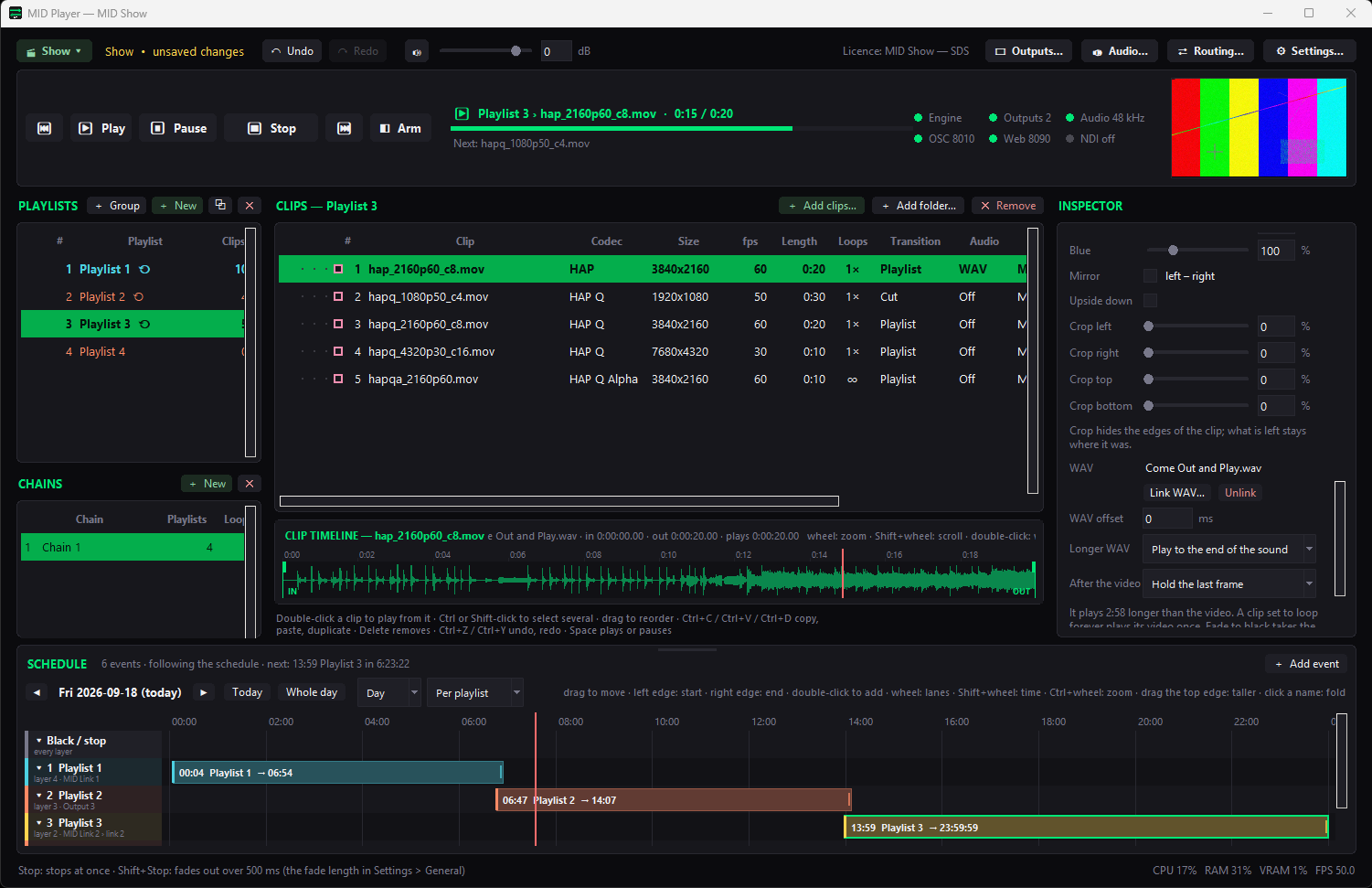
MID Player, a HAP video player: playlists, clips, clip timeline, inspector and schedule

Why HAP

The codec that leaves the processor alone.

HAP is a video codec made for smooth playback of large, high-frame-rate content: the picture is decoded by the graphics card instead of the processor. That is why it is the usual choice for video walls, LED screens, projection mapping and any show where a dropped frame is seen by everyone in the room.

MID Player is built around it. A separate playout engine on the graphics card shows the picture and plays the sound, and if the engine ever stops unexpectedly a new one takes over and resumes the clip where it was, within about two seconds.

What it plays

All four HAP flavours, plus sound and stills.

  • HAP, HAP Alpha, HAP Q and HAP Q Alpha in .mov files
  • WAV sound, linked to a clip or played on its own
  • PNG and JPEG pictures, next to your clips
  • Live sources next to the files: NDI® sources, capture devices, application sound, an audio input and MID Link streams
  • A file it cannot play is still added to the list, with the reason in red — you never wonder why a clip stays black

MID Player plays open formats only, so a file in another codec (for example H.264) is not played and says so.

Video playlists

Playlists you can chain, group, stack and schedule.

A video playlist in MID Player is more than a list. Several playlists play at the same time, each on a layer of its own; chains play playlists one after another; groups start and stop together; stacks let several clips of one playlist play at the same moment.

  • Loops per clip, in and out points on a timeline with the sound waveform, a crossfade between clips or back into the clip's own loop
  • Cut, fade or fade-over transitions, per clip or per playlist
  • Arm a clip so its first frame shows, paused, and start it exactly on cue
  • A schedule by time of day, so the show starts and changes without anyone pressing play
  • Freeze every output at once while the show plays on behind it
Video playlist with clips, loops, transitions and the clip timeline in MID Player

Many screens

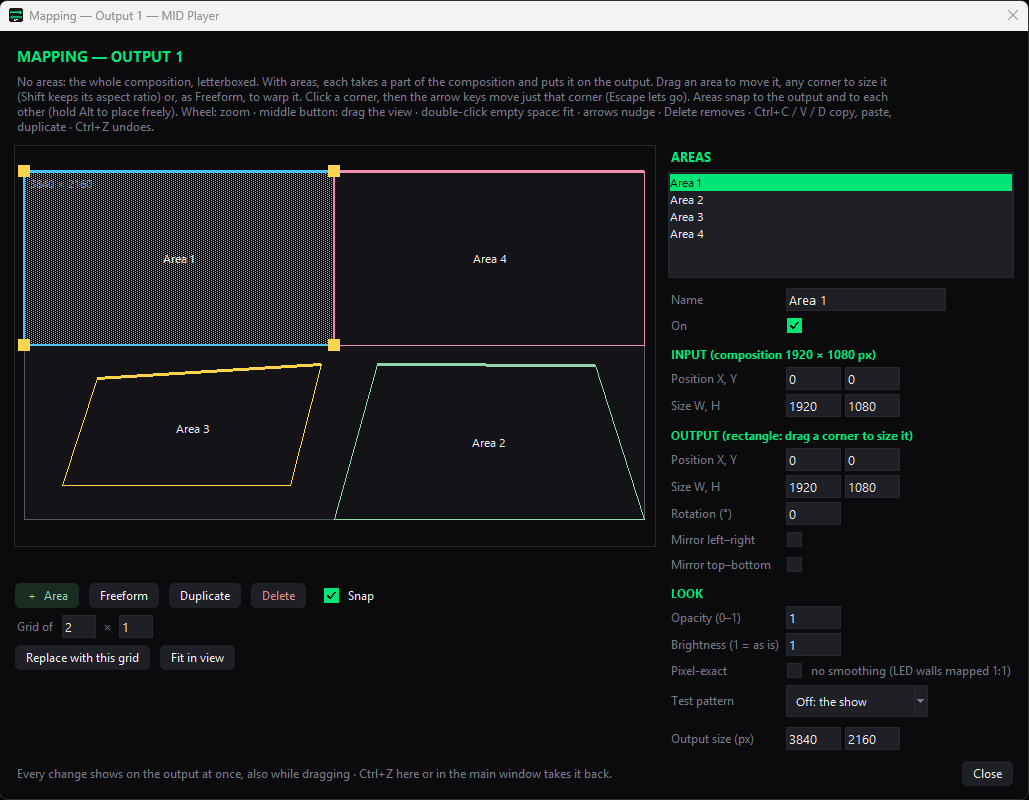
Output mapping of a HAP player: one video cut into Areas and sent to several screens

One HAP video across many screens.

Add as many outputs as the show needs — a full-screen or windowed output on any connected display, an NDI® output or a MID Link output — and cut each output into Areas that show exactly the part of the picture that belongs there.

  • Rectangle Areas you move, resize, rotate and mirror, or Freeform Areas you warp by dragging the four corners
  • Pixel-exact mode for LED walls whose pixels must line up one to one
  • Routing: choose which clip plays on which output, and where each playlist is heard
  • Save the whole output setup as a preset and load it back at the next show

Control

Run it from the window, a phone or your show controller.

Play, arm and edit from the app, from a web page on a phone or tablet on the same network, over the internet, or with OSC from a show controller. Televisions that have nothing but a browser can play a playlist of their own as signage screens, and the picture can be shared with other computers over the internet with MID Link.

Questions

Frequently asked questions

Which HAP files does MID Player play?

HAP, HAP Alpha, HAP Q and HAP Q Alpha in .mov files, with PCM sound. It also plays WAV files, PNG and JPEG pictures and a set of live sources such as NDI®, capture devices and MID Link.

Does MID Player play H.264 or MP4 files?

No. MID Player plays open formats only, so a file in a codec like H.264 is added to the list with a red note saying it is not played. Use HAP files for MID Player.

Is HAP better than other video codecs for playout?

HAP is made for the situation where many frames of high-resolution video have to come out on time: it is decoded by the graphics card and uses very little of the processor. That is why it is the usual choice for video walls, LED screens and projection mapping.

Can I play several videos at once?

Yes. Several playlists play side by side, each on its own layer, and a clip stack plays several clips of one playlist at the same time. Each clip can be sent to its own output.

Can a HAP player run on a schedule?

Yes. MID Player has a schedule by time of day: blocks start playlists at the time you set, so a show or a looping display starts and changes by itself.

Which operating system does it need?

MID Player runs on Windows 10 and Windows 11, 64-bit, as part of the MID Tech installer.
MID Player is part of the Show tier

Included in the Show tier together with MID Countdown, MID Sync and MID Generator, and in Full Suite. Try the installer first; it runs in trial mode until you activate a code.

NDI® is a registered trademark of Vizrt NDI AB. ndi.video