MT MID Tech

Video streaming

Stream video and sound between computers, over the internet or the network.

MID Link sends a MID Player's picture and sound straight to every other MID Player or browser in the same group. Join with a group name and a password, no account, no server in between, encrypted end to end.

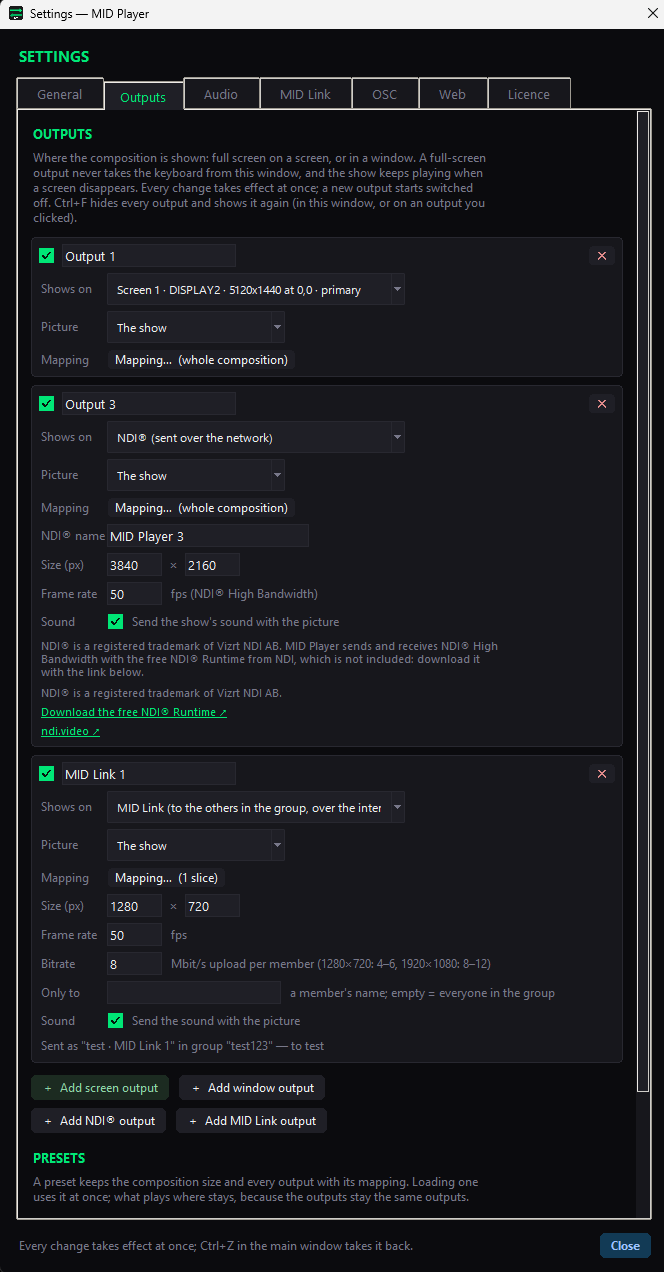
MID Player Settings, Outputs: a screen output, an NDI output and a MID Link output for streaming video

Peer-to-peer

Straight between the computers.

Every member of a group finds the others and connects directly to them. The picture and sound go from computer to computer, encrypted end to end; MID Tech's own servers see none of it. Only the first handshake passes over encrypted public relays.

  • Join a group by name and password, from MID Player or from any browser at midtech.be/link
  • A MID Link output sends a MID Player's picture and sound; add it in Settings and route it like any output
  • The stream plays in the receiving MID Player like any clip
  • Settings lists every watcher and how it connected: on this network, straight over the internet, or over a relay

From a browser

No MID Player needed to watch or send.

Anyone joins at midtech.be/link with the same group name and password. The page shows everyone in the group, and it can send a camera, a screen or window, a test picture with tone, and a microphone.

  • Watch the picture of a MID Player on a laptop, a phone or a television
  • Send your camera or a shared window to the MID Players in the group
  • Used live in a real show

Quality and bandwidth

You choose the picture, the frame rate and the bitrate.

Set the size, the frame rate and the bitrate of every MID Link output, whether it sends sound, and optionally send it to one member only. The bitrate is either for each member or shared by all members, which keeps your total upload at the number you set whoever joins.

Getting through the network

Ways round a strict firewall, built in.

Two computers only fail to find each other when neither can be reached. MID Player gives you ways round that: a port of its own that it asks your router to open, so the picture still goes straight; a relay server of yours, or one MID Tech switches on for your licence, for the one case a port cannot solve; and a meeting point of its own for a venue network with no internet. When a member cannot be reached, MID Link says why.

On the local network

NDI® output for the studio, MID Link for everywhere else.

MID Player also sends NDI® High Bandwidth video over the network, ready to key or composite downstream, and receives it. NDI® needs the free NDI® Runtime, a separate download from NDI: Download the free NDI® Runtime. Together with signage screens and the HAP player, that makes one app for playing, mapping and sharing video.

Questions

Frequently asked questions

How do I stream video from one computer to another over the internet?

Switch MID Link on in MID Player, choose a group name and password, and add a MID Link output. Every other MID Player, or any browser at midtech.be/link, that joins the same group can watch it.

Does the video go through MID Tech servers?

No. The picture and sound go directly between the computers, encrypted end to end. Only the first handshake passes over encrypted public relays, and MID Tech's own servers see none of the stream.

Can I watch in a browser without installing anything?

Yes. Open midtech.be/link, enter the group name and password, and the page shows everyone in the group.

What bitrate should I use?

As a guide, about 4–6 Mbit/s for 1280 × 720 and 8–12 Mbit/s for 1920 × 1080. Your upload carries the picture once per watcher, unless you choose a bitrate shared by all members.

Does it work behind a firewall?

Usually, yes. Some networks with strict firewalls on both ends may still fail to connect directly. MID Player can ask your router to open a port, use a relay server, or act as a meeting point on a venue network, and it says why a member could not be reached.
MID Player is part of the Show tier

Included in the Show tier together with MID Countdown, MID Sync and MID Generator, and in Full Suite. Try the installer first; it runs in trial mode until you activate a code.

NDI® is a registered trademark of Vizrt NDI AB. ndi.video